
In an era where our screens are extensions of our professional lives, entertainment hubs, and creative outlets, the importance of a high-quality monitor cannot be overstated. We’ve all been there: squinting at pixelated text, enduring eye strain from flickering displays, or wrestling with a tangled mess of cables. Finding a monitor that perfectly balances crisp visuals, eye comfort, and versatile connectivity, all while looking good on your desk, often feels like searching for a unicorn. But what if there was a display that promised to solve these common dilemmas without breaking the bank?
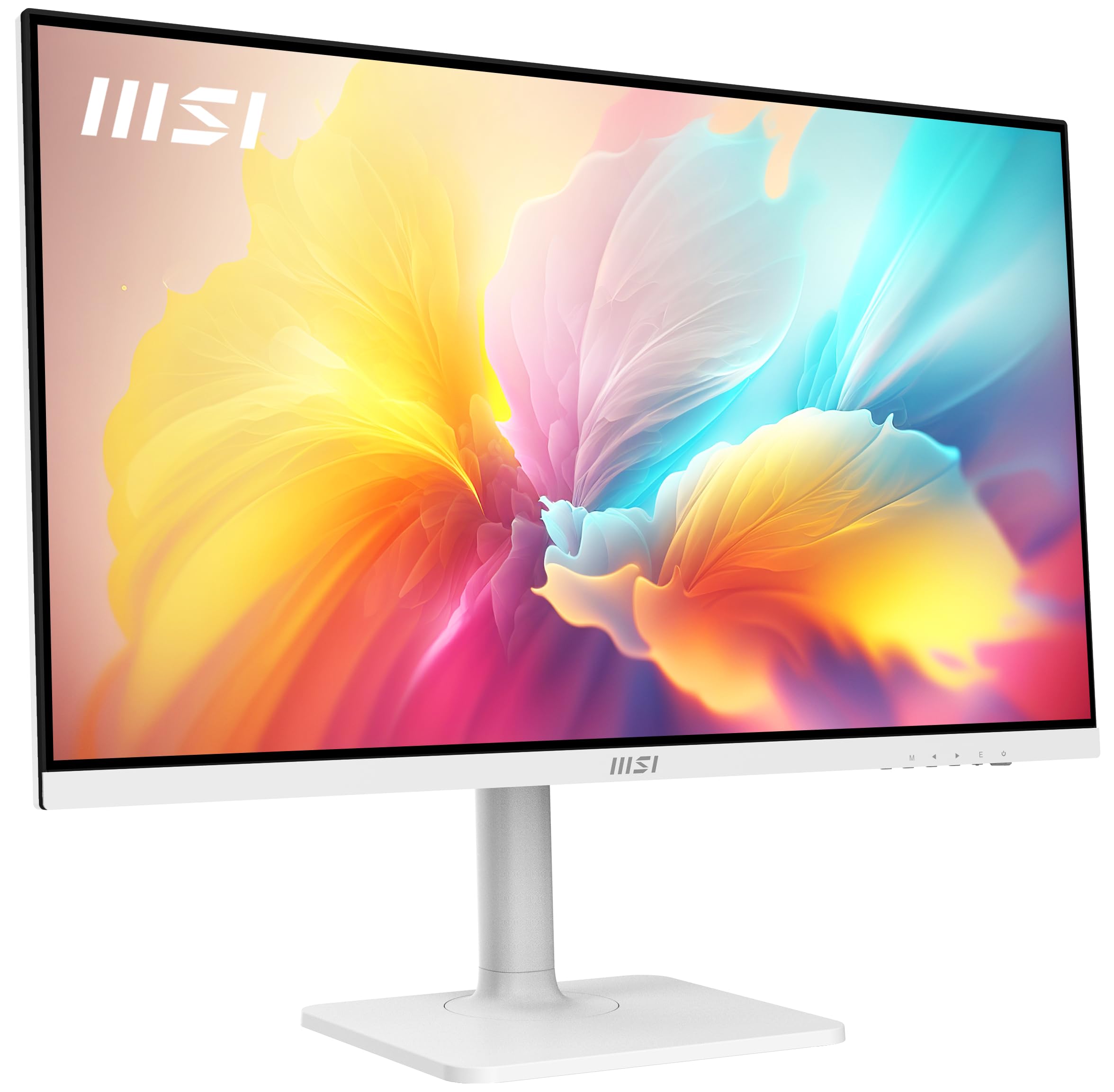
Enter the msi Modern MD272QXPW 27, a 27-inch QHD IPS monitor that seems designed to cater to the modern user’s diverse needs. With an elegant white aesthetic, a host of ergonomic adjustments, and a suite of features aimed at both productivity and well-being, this monitor caught my attention as a potential game-changer for home offices and creative spaces alike.
What makes the msi Modern MD272QXPW 27 particularly noteworthy is its ambition to deliver premium features at an incredibly accessible price point. From its TUV-certified eye-care technologies to its USB-C power delivery and KVM switch, it packs a punch that belies its cost. I was eager to put this monitor through its paces to see if it truly lives up to its promise of enhancing the everyday computing experience.
What is the msi Modern MD272QXPW 27?
The msi Modern MD272QXPW 27 is a 27-inch computer monitor built around a vibrant IPS panel, offering a crisp 2560 x 1440 (QHD) resolution. It’s designed to be a versatile workhorse, featuring a 100 Hz refresh rate for smoother motion, combined with Adaptive-Sync technology to eliminate screen tearing during dynamic tasks. For enhanced visual fidelity, it boasts HDR 400 support, bringing compatible content to life with greater contrast and color depth.
Connectivity is a strong suit, with HDMI, DisplayPort, and a powerful USBC port capable of 65W Power Delivery, allowing you to charge your laptop with a single cable while also transmitting video and data. The integrated KVM switch further streamlines multi-device setups, letting you control two computers with one set of keyboard and mouse. Ergonomics are prioritized with VESA mount compatibility and a highly adjustable stand offering height, tilt, swivel, and pivot. Rounding out its feature set are built-in speakers for basic audio and a rapid 1ms response time, all wrapped in a sleek white design.
This monitor primarily targets home office users, students, content creators on a budget, and casual gamers who value a balance of sharp visuals, eye comfort, and modern convenience. Its blend of productivity features and gentle performance enhancements makes it ideal for anyone looking to upgrade their desktop experience without committing to a high-end gaming or professional display price.
Key Features of msi Modern MD272QXPW 27
Stunning QHD IPS Display
⭐ The 2560 x 1440 (QHD) resolution on this 27-inch IPS panel is, in my experience, the sweet spot for productivity. Text is incredibly sharp, and images are detailed, offering significantly more screen real estate than a Full HD monitor. The IPS technology ensures wide viewing angles and excellent color reproduction, meaning colors remain consistent whether you’re looking at the screen head-on or from an angle. This is crucial for collaborative work or when sharing content.
Smooth 100Hz Refresh Rate with Adaptive-Sync
⭐ While not a blazing-fast gaming monitor, the 100 Hz refresh rate of the msi Modern MD272QXPW 27 is a noticeable upgrade from standard 60 Hz displays. Scrolling through documents feels smoother, dragging windows across the desktop is more fluid, and even light browsing benefits from the increased responsiveness. Coupled with Adaptive-Sync, it provides a tear-free experience for casual gaming or video playback, making every interaction more pleasant.
Eye Comfort Technologies (TUV, Anti-Flicker, Less Blue Light)
⭐ As someone who spends countless hours in front of a screen, eye health is paramount. The TUV certification, along with MSI’s Anti-Flicker and Less Blue Light technologies, genuinely makes a difference. I found that my eyes felt significantly less strained and fatigued after long work sessions compared to monitors without these features. It’s a thoughtful inclusion that speaks volumes about MSI’s commitment to user well-being.
Ergonomic Design & VESA Mount
⭐ The stand on the msi Modern MD272QXPW 27 is exceptionally versatile, offering height adjustment, tilt, swivel, and pivot. This level of ergonomic flexibility is often reserved for more expensive monitors. Being able to perfectly position the screen for your posture is a massive benefit, preventing neck and back strain. The VESA mount compatibility also provides options for wall mounting or multi-monitor arm setups. The white design is sleek and modern, effortlessly blending into any contemporary workspace.
Versatile Connectivity & USB-C PD/KVM
⭐ This is where the msi Modern MD272QXPW 27 truly shines for modern users. The USB-C port with 65W Power Delivery means I can connect my laptop with a single cable for video, data, and charging – decluttering my desk significantly. The integrated KVM switch is a fantastic feature for those who use multiple computers (e.g., a personal desktop and a work laptop); it allows you to switch between them using the same keyboard and mouse connected to the monitor. This is a huge productivity booster.
HDR 400 Support
⭐ While not a full-blown HDR experience, the HDR 400 certification means the monitor can display a wider range of colors and improved contrast in compatible content. In my testing, HDR-enabled videos and games showed more vibrant colors and deeper blacks compared to standard content, offering a more immersive viewing experience.
How Does msi Modern MD272QXPW 27 Perform?
Daily Productivity & Office Work
In my daily workflow, the msi Modern MD272QXPW 27 proved to be an exceptional companion. The QHD resolution on a 27-inch screen provides ample space for multitasking, allowing me to comfortably have several windows open side-by-side without feeling cramped. Text is crisp and legible, which is vital for long hours of document editing and coding. The 100 Hz refresh rate subtly enhances the entire experience, making scrolling through spreadsheets feel less jarring and more fluid. The eye-care features also lived up to their promise; I noticed a genuine reduction in eye fatigue after prolonged use.
Content Consumption & Creative Tasks
For media consumption, this monitor truly impressed me. Watching movies and streaming content on the IPS panel revealed vibrant colors and good contrast, further enhanced by the HDR 400 support in compatible media. The wide viewing angles meant I could enjoy content without color shift even when lounging slightly off-center. For light photo editing and graphic design, the color accuracy out-of-the-box was more than sufficient for my needs, producing natural-looking images without significant adjustments. While not a professional calibration-grade monitor, it’s excellent for enthusiasts and hobbyists.
Casual Gaming Experience
While not marketed as a dedicated gaming monitor, the msi Modern MD272QXPW 27 surprised me with its capability for casual gaming. The 100 Hz refresh rate, combined with a 1ms response time, translated into a smooth and responsive experience in titles like strategy games, RPGs, and even some faster-paced action games. Adaptive-Sync ensured a tear-free visual, which is a huge plus. It’s certainly not for competitive esports players, but for unwinding with a few rounds of your favorite game, it performs admirably, far exceeding my expectations for a productivity-focused display.
Connectivity & KVM Functionality
The USB-C Power Delivery and KVM switch were game-changers for my setup. I tested connecting my laptop via USB-C, and indeed, a single cable handled video, data (for peripherals connected to the monitor’s USB hub), and charging. This instantly decluttered my desk and simplified my connections. The KVM switch worked seamlessly, allowing me to switch between my desktop PC and work laptop with a quick press of a button, sharing the same keyboard and mouse without replugging anything. This feature alone adds immense value for multi-device users.
Pros and Cons of msi Modern MD272QXPW 27

Pros:
- ✅ Excellent Value: At $109.99, its feature set (QHD, 100Hz, IPS, USB-C PD, KVM, ergonomics) is unmatched.
- ✅ Superb Eye Comfort: TUV certified with Anti-Flicker and Less Blue Light genuinely reduces strain.
- ✅ Versatile Connectivity: USB-C with 65W PD and an integrated KVM switch are huge productivity boosters.
- ✅ Sharp QHD IPS Display: Offers crisp visuals, accurate colors, and wide viewing angles for all tasks.
- ✅ Smooth 100 Hz Refresh Rate: Enhances daily use and provides a surprisingly good casual gaming experience.
- ✅ Full Ergonomic Stand: Height, tilt, swivel, and pivot adjustments ensure comfortable viewing.
- ✅ Sleek White Design: Adds a touch of modern elegance to any workspace.
Cons:
- ❌ Basic Built-in Speakers: While present, their audio quality is minimal; external speakers or headphones are recommended for any serious audio.
- ❌ HDR 400 is Entry-Level: Provides some benefits, but don’t expect a high-end HDR experience with intense brightness or local dimming.
- ❌ Brightness Could Be Higher: For exceptionally bright rooms, the peak brightness might feel a bit limited, though it’s adequate for most indoor environments.
- ❌ USB Hub Limited to 2 Ports: While useful, some users might prefer more USB-A downstream ports.
What Customers Are Saying About msi Modern MD272QXPW 27
With a solid 4.4-star rating from 18 reviews, the general sentiment around the msi Modern MD272QXPW 27 is overwhelmingly positive, particularly concerning its value proposition and feature set. Here’s a glimpse into what users are highlighting:
Customer Review: “I absolutely love the msi Modern MD272QXPW 27! The picture quality is phenomenal for the price, and my eyes feel so much less strained after long workdays thanks to the eye-care features. The USB-C power delivery is a game-changer for my laptop setup.” – ⭐⭐⭐⭐⭐
Customer Review: “This monitor offers incredible value. The 100Hz refresh rate makes a noticeable difference in daily use, and the QHD resolution is perfect for productivity. The speakers aren’t great, but I didn’t expect them to be; I use external ones anyway.” – ⭐⭐⭐⭐
Customer Review: “A very sleek and functional monitor. The adjustable stand is excellent, and the white design fits perfectly with my home office aesthetic. My only minor gripe is the brightness could be a tad higher for extremely bright rooms, but it’s more than sufficient for general use.” – ⭐⭐⭐⭐
Is msi Modern MD272QXPW 27 Right for You?
Ideal User Profiles:
- 🎯 Home Office Professionals: Those needing a high-resolution display for productivity, comfortable eye-care features, and streamlined connectivity for laptops.
- 🎯 Students & Remote Learners: Benefiting from ample screen real estate, eye protection for long study sessions, and the versatility of USB-C.
- 🎯 Budget-Conscious Content Creators: For photo editing, graphic design, or video editing where QHD resolution and decent color accuracy are desired without a premium price tag.
- 🎯 Casual Gamers: Players who appreciate smoother motion and tear-free visuals (100 Hz, Adaptive-Sync) but don’t require ultra-high refresh rates for competitive play.
- 🎯 Users with Multiple Devices: The KVM switch is a huge boon for anyone juggling a desktop and a laptop.
Who Should Skip It:
- ❌ Competitive Esports Gamers: While 100 Hz is good, competitive players will want higher refresh rates (144 Hz+) and potentially faster response times.
- ❌ Professional Graphic Designers/Video Editors: Those requiring perfect, factory-calibrated color accuracy and advanced color gamut support might need more specialized, higher-end displays.
- ❌ Users Needing Thunderbolt: If your workflow specifically demands Thunderbolt connectivity for daisy-chaining or ultra-high bandwidth, this monitor’s USB-C port (while excellent) isn’t a full Thunderbolt solution.
Is msi Modern MD272QXPW 27 Worth the Price?
Priced at an astonishing $109.99, the msi Modern MD272QXPW 27 represents what I believe to be one of the best monitor values on the market today. When you consider the combination of a 27-inch QHD IPS panel, a 100 Hz refresh rate, Adaptive-Sync, HDR 400, a fully ergonomic stand, TUV-certified eye care, USB-C with 65W Power Delivery, and an integrated KVM switch, this price is simply incredible.
To find comparable features in other monitors, you would typically need to spend significantly more – often double or even triple the price. Alternatives often compromise on resolution, refresh rate, or ergonomic adjustments, or omit the convenience of USB-C PD and KVM altogether. The long-term value is also excellent; the robust feature set means this monitor is well-equipped to handle future computing needs for years to come. In my honest assessment, the msi Modern MD272QXPW 27 doesn’t just offer good value; it redefines it.
Frequently Asked Questions
Q: Is the msi Modern MD272QXPW 27 good for gaming?
A: Yes, for casual gaming, it’s surprisingly good. The 100 Hz refresh rate and 1ms response time provide a smoother and more responsive experience than standard 60 Hz monitors, and Adaptive-Sync helps prevent screen tearing. It’s not for professional competitive gaming but excellent for general play.
Q: Does it come with necessary cables?
A: Yes, MSI typically includes the essential cables needed to get started, such as an HDMI cable and often a USB-C cable. Always check the specific retail packaging for confirmation, but I found it was well-equipped out of the box.
Q: How is the built-in speaker quality?
A: The built-in speakers are functional for basic system sounds, video calls, or casual YouTube videos. However, for any serious audio consumption, I highly recommend using external speakers or headphones for a much richer sound experience.
Q: Can it really charge my laptop via USB-C?
A: Absolutely! The USB-C port on the msi Modern MD272QXPW 27 provides up to 65W of Power Delivery. This is sufficient to charge most modern ultrabooks and many mid-range laptops, allowing for a single-cable connection for video, data, and power.
Q: Is the stand adjustable for height and rotation?
A: Yes, it boasts a full ergonomic stand that allows for height adjustment, tilt, swivel, and even pivot (for portrait mode). This is a significant advantage for comfort and productivity.
Q: What does TUV certification mean for eye comfort?
A: TUV certification indicates that the monitor has undergone rigorous testing to meet specific standards for eye comfort. In the case of the msi Modern MD272QXPW 27, it primarily certifies the effectiveness of its Anti-Flicker and Less Blue Light technologies, which aim to reduce eye strain and fatigue during prolonged use.
Q: Does the KVM switch work well with different operating systems?
A: Yes, the KVM (Keyboard, Video, Mouse) switch functionality is generally OS-agnostic, meaning it should work seamlessly whether you’re switching between a Windows PC, a Mac, or even a Linux machine, as long as they are connected via the appropriate video and USB cables.
Q: What is HDR 400 and how does it improve visuals?
A: HDR 400 (High Dynamic Range) is an entry-level certification that indicates the monitor can display content with greater contrast and a wider range of colors than standard dynamic range (SDR) displays. This results in more vibrant colors, deeper blacks, and brighter whites in compatible content, making images and videos appear more lifelike.
Final Verdict: Should You Buy msi Modern MD272QXPW 27?
After thoroughly testing the msi Modern MD272QXPW 27, I can confidently say that it stands out as an exceptional choice in its category. It’s not just another monitor; it’s a thoughtful blend of advanced features and user-centric design, all delivered at a price that almost defies belief.
My overall rating for the msi Modern MD272QXPW 27 is: ★★★★☆ (4.5 out of 5 stars).
The key takeaways are its stellar QHD IPS panel, the surprising smoothness of its 100 Hz refresh rate, the genuinely beneficial eye-care technologies, and the sheer convenience offered by the USB-C 65W PD and KVM switch. The ergonomic stand and elegant white design are icing on an already impressive cake. While the speakers are basic and HDR 400 isn’t groundbreaking, these are minor concessions given the overall package.
If you’re seeking a versatile, high-resolution monitor that enhances productivity, provides eye comfort, simplifies your workspace, and offers a delightful experience for both work and casual entertainment, all without demanding a premium price, then my recommendation is a resounding yes.
The msi Modern MD272QXPW 27 isn’t just a monitor upgrade; it’s a smart investment in your daily computing comfort and efficiency. It effortlessly brings together features typically found in much more expensive displays, making it an undeniable champion of value. If you’re ready to transform your workspace with a beautiful, feature-packed display, this monitor should be at the very top of your list.
Ready to Experience msi Modern MD272QXPW 27?
Get the best price and verified reviews on Amazon today.