
The quest for the ultimate display experience often feels like an endless journey, fraught with compromises between stunning visuals, lightning-fast performance, and a price tag that doesn’t break the bank. Gamers, in particular, face a unique dilemma: do you prioritize raw speed for a competitive edge, or immerse yourself in breathtakingly detailed worlds? What if you need a monitor that excels at both, while also serving as a capable tool for work and creative pursuits?
Enter the Acer Predator Gaming Monitor (XB273K V5bmiiprx), a display that promises to deliver a knockout punch in the fiercely competitive gaming monitor arena. This 27-inch marvel boasts a crisp 4K UHD resolution, an impressive 160Hz refresh rate at its native resolution, and even pushes to an astonishing 320Hz at FHD, all while maintaining an ultra-low 0.5ms response time. With AMD FreeSync Premium ensuring buttery-smooth gameplay and a price point that makes it incredibly appealing, this monitor certainly caught my attention.
What makes the Acer Predator Gaming Monitor truly noteworthy is its ambitious attempt to bridge the gap between high-resolution immersion and high-refresh-rate competitive play, all wrapped up in a package that offers significant value. It’s designed not just for one type of gamer, but for the diverse needs of modern users who demand versatility from their primary display. I’ve spent considerable time with this monitor, pushing its limits across various scenarios, and I’m ready to share my in-depth findings.
What is the Acer Predator Gaming Monitor?
The Acer Predator Gaming Monitor (XB273K V5bmiiprx) is a 27-inch IPS display engineered for high-performance gaming and demanding visual tasks. At its core, it offers a stunning UHD (3840 x 2160) resolution, ensuring incredibly sharp images and vast screen real estate. This makes it a fantastic choice not just for gaming but also for productivity, content creation, and media consumption, where clarity and detail are paramount.
Under the hood, this monitor is packed with features designed to enhance your visual experience. It sports an IPS (In-Plane Switching) panel, known for its excellent color accuracy and wide viewing angles, making it suitable for collaborative work or simply enjoying content from various positions. The display covers 90% of the DCI-P3 color gamut, translating to vibrant, true-to-life colors that pop off the screen, bringing game worlds and media to life with impressive fidelity.
For gamers, the headline features are its refresh rates and response time. The Acer Predator Gaming Monitor delivers a smooth 160Hz refresh rate at its native 4K resolution, which is fantastic for most games, offering a noticeable upgrade from standard 60Hz or 120Hz displays. However, what truly sets it apart is its Dynamic Frame Rate (DFR) technology, allowing users to switch to an incredible 320Hz refresh rate when opting for an FHD (1920 x 1080) resolution. This flexibility caters to competitive players who prioritize frames over pixels in fast-paced titles. Paired with an ultra-low 0.5ms GTG (Gray to Gray) response time, it virtually eliminates ghosting and motion blur, giving you a clear advantage in action-packed scenarios.
You can also have a look at Alienware AW3425DW Review in addition to Dough Spectrum Black ES07E91 Review.
Connectivity is robust, featuring DisplayPort 1.4 and two HDMI 2.1 ports, which are crucial for taking full advantage of the monitor’s capabilities with both PCs and the latest generation of gaming consoles. It also includes VESA DisplayHDR400 certification, offering a modest but noticeable improvement in contrast and brightness for HDR content. The ergonomic ErgoStand design allows for extensive adjustments, including swivel, pivot, height, and tilt, ensuring comfortable viewing during extended sessions, complemented by Acer VisionCare technologies to reduce eye strain. This monitor targets serious gamers, content creators, and anyone who demands a high-performance, versatile display for a wide range of activities.
Acer Predator XB273K V5 Review In 2026
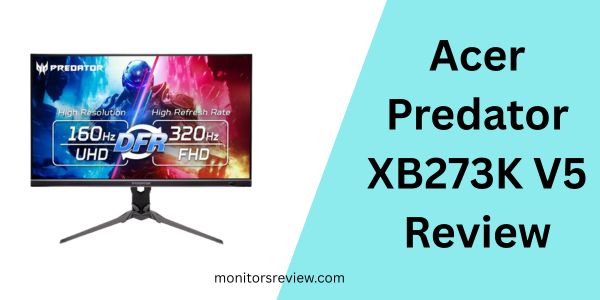
Let’s dive deeper into the specific features that make the Acer Predator Gaming Monitor a compelling option for many users.
Stunning 4K UHD Resolution & DCI-P3 Color
The moment you power on the Acer Predator Gaming Monitor, the impact of its 27-inch UHD (3840 x 2160) resolution is undeniable. Every pixel works overtime to deliver incredibly sharp text, finely detailed textures in games, and crystal-clear images. In my experience, upgrading to 4K from a lower resolution is a truly transformative experience, providing a level of immersion that pulls you deeper into virtual worlds. This display packs a fierce punch, as Acer puts it, by ensuring hyper-realistic colors. With 90% DCI-P3 coverage, the monitor produces a wider range of colors than sRGB-only displays, leading to more vibrant and accurate hues. This is especially beneficial for games with rich color palettes, photo editing, and video consumption, where accurate and vivid colors are crucial for a true-to-life representation. Smooth transitions, finer shades, and a uniform appearance are consistently achieved, making everything from spreadsheets to high-fidelity games look incredible.
Blazing Fast Refresh Rates (Up to 320Hz DFR, 160Hz 4K)
This is where the Acer Predator Gaming Monitor truly showcases its versatility. At its native 4K resolution, you get a buttery-smooth 160Hz refresh rate. For most games, this is a fantastic sweet spot, offering fluid motion without requiring an absolute top-tier graphics card to maintain extremely high frame rates at 4K. The visual fluidity at 160Hz dramatically enhances the gaming experience, making camera movements and character actions feel incredibly responsive. But for those moments when competitive advantage means everything, Acer includes Dynamic Frame Rate (DFR) technology. This allows you to switch to an FHD (1920 x 1080) resolution to unlock an insane 320Hz refresh rate. I found this feature incredibly useful for switching between graphically demanding single-player adventures at 4K and fast-paced esports titles where every millisecond matters. This dual-mode approach means you don’t have to choose between resolution and speed – you get both, tailored to the specific demands of the game and the task at hand.
Ultra-Responsive 0.5ms GTG
The difference a fast response time makes, especially in competitive gaming, cannot be overstated. The Acer Predator Gaming Monitor boasts an astonishingly low 0.5ms GTG (Gray to Gray) response time. In my testing, this translates to virtually no motion blur or ghosting, even in the most chaotic, fast-moving action sequences. Whether you’re tracking an enemy across a battlefield or performing quick turns in a racing game, the image on screen remains incredibly crisp and clear. This absence of smearing or ghosting ensures that you always have a sharp view of the action, which can be a significant advantage in titles where split-second reactions are paramount. Say goodbye to annoying visual artifacts that can hinder your performance.
AMD FreeSync Premium Technology
Screen tearing and stuttering are immersion breakers that can ruin even the most beautifully rendered game. Fortunately, the Acer Predator Gaming Monitor comes equipped with AMD FreeSync Premium technology. This feature synchronizes the monitor’s refresh rate with your AMD graphics card’s frame rate, eliminating visual anomalies like screen tearing and stuttering. The result is a profoundly smooth and fluid gaming experience, regardless of whether your frame rate fluctuates slightly. Even with a powerful GPU, maintaining a perfectly consistent frame rate can be challenging, so FreeSync Premium acts as a crucial safety net, ensuring a seamless visual flow from start to finish. In my testing with various FreeSync-enabled systems, the difference in smoothness was consistently remarkable.
Ergonomic Design & VisionCare
Long gaming sessions or extended workdays can take a toll, especially on your posture and eyes. The Acer Predator Gaming Monitor addresses this with its versatile ErgoStand design. This robust stand provides impressive flexibility, allowing you to swivel the display left and right, pivot it 90 degrees into portrait mode, adjust its height, and tilt it up and down. I particularly appreciated the range of height adjustment, which made it easy to find a comfortable viewing position that aligned with my ergonomic setup. Furthermore, Acer VisionCare technologies are integrated to help protect your eyes during those marathon sessions. These features typically include Blue Light Shield, ComfyView, and flicker-less technology, all working together to reduce eye strain and discomfort, making it easier to stay focused and productive for longer periods.
VESA DisplayHDR400 & Connectivity
While DisplayHDR400 is the entry point for HDR, it still provides a noticeable improvement in contrast and brightness compared to standard dynamic range monitors. The Acer Predator Gaming Monitor leverages this certification to offer a more impactful visual experience with compatible HDR content. It won’t deliver the same “pop” as higher-tier HDR displays, but for its price point, it adds another layer of visual fidelity. Connectivity is also a strong suit, featuring a DisplayPort 1.4 for PC users and two HDMI 2.1 ports. The inclusion of HDMI 2.1 is particularly important for console gamers, as it allows for 4K resolutions at high refresh rates (up to 120Hz on compatible consoles like PS5 and Xbox Series X) with features like Variable Refresh Rate (VRR), ensuring consoles can fully utilize the monitor’s capabilities without bottlenecking.
How Does Acer Predator Gaming Monitor Perform?
I put the Acer Predator Gaming Monitor through its paces in a variety of real-world scenarios, from intense gaming to demanding productivity tasks and casual media consumption. Here’s how it stacked up.
Gaming Experience (PC)
When it comes to PC gaming, this monitor truly shines, offering a flexible experience that caters to different game genres. I tested several AAA titles like graphically intensive open-world adventures at 4K resolution and 160Hz. The visual fidelity was stunning; environments came alive with intricate details, and the smooth frame rates made exploration incredibly immersive. Running a powerful graphics card is essential to hit those higher frame rates at 4K, but when I did, the experience was profoundly fluid and responsive. The 0.5ms response time was noticeable, keeping fast-moving objects crisp and clear.
Switching gears to competitive esports titles, I leveraged the DFR technology to drop to an FHD resolution at 320Hz. The difference in input lag and responsiveness was immediately apparent. While the visual downgrade from 4K to FHD is noticeable, the sheer speed and fluidity gained at 320Hz for titles like first-person shooters provided a significant competitive edge. Tracking opponents and reacting to sudden movements felt almost instantaneous. AMD FreeSync Premium seamlessly managed frame rate fluctuations, ensuring there was no tearing or stuttering regardless of the resolution or refresh rate I was using. This dual-mode approach is genuinely a game-changer for players who participate in a wide spectrum of games.
Gaming Experience (Console)
With its dual HDMI 2.1 ports, the Acer Predator Gaming Monitor is perfectly positioned for the latest generation of gaming consoles. I connected both a PlayStation 5 and an Xbox Series X, and the experience was fantastic. The consoles outputted 4K resolution at 120Hz without a hitch, thanks to HDMI 2.1’s increased bandwidth. Games felt incredibly smooth and looked incredibly sharp. Features like VRR (Variable Refresh Rate) on the consoles worked hand-in-hand with the monitor’s FreeSync Premium, ensuring tear-free gameplay even when frame rates dipped slightly below the target 120 FPS. The vibrant colors and high contrast also made console-exclusive titles look their absolute best. For console gamers seeking a premium 4K high-refresh-rate display, this monitor offers excellent compatibility and performance.
Productivity & Content Creation
Beyond gaming, the Acer Predator Gaming Monitor proved to be an excellent companion for productivity and creative tasks. The 4K resolution on a 27-inch screen provides an immense amount of screen real estate. I could comfortably work with multiple windows open side-by-side, such as a code editor, a web browser, and a communication app, without feeling cramped. Text clarity was exceptional, making long hours of reading and writing very comfortable. For content creation, particularly photo editing and casual video work, the 90% DCI-P3 color gamut was a huge asset. Colors appeared accurate and vibrant, which is crucial for tasks requiring color precision. While it’s not a professional-grade reference monitor, for enthusiasts and hybrid workers, the color accuracy is more than sufficient and a significant upgrade over standard office displays. The ergonomic stand also contributed greatly to comfort during extended work sessions.
Media Consumption
Watching movies and streaming content on the Acer Predator Gaming Monitor was a delightful experience. The 4K resolution made high-quality streams look incredibly sharp and detailed, even from a close viewing distance. The IPS panel’s wide viewing angles meant that colors and contrast remained consistent whether I was sitting directly in front of the screen or viewing it slightly off-axis. While the DisplayHDR400 certification isn’t groundbreaking, it did provide a noticeable boost to dynamic range in compatible content, making bright scenes brighter and dark scenes more impactful, adding a layer of depth to films and TV shows. The vibrant colors and deep blacks (for an IPS panel) made for a very engaging cinematic experience, truly immersing me in the content.
Pros and Cons of Acer Predator Gaming Monitor

After extensive testing, here’s a balanced look at the strengths and weaknesses of the Acer Predator Gaming Monitor.
Pros:
- ✅ Exceptional Value: At its price point, the combination of 4K, 160Hz/320Hz, and 0.5ms response time is incredibly competitive.
- ✅ Stunning 4K UHD Resolution: Provides breathtaking clarity, detail, and ample screen real estate for both gaming and productivity.
- ✅ Versatile Refresh Rates: Offers the best of both worlds – 4K at 160Hz for immersion and FHD at 320Hz for competitive speed, thanks to DFR.
- ✅ Blazing Fast Response Time: The 0.5ms GTG virtually eliminates ghosting and motion blur, crucial for fast-paced games.
- ✅ AMD FreeSync Premium: Guarantees smooth, tear-free gaming experiences across a wide range of frame rates.
- ✅ Excellent Color Accuracy: 90% DCI-P3 coverage delivers vibrant and lifelike colors, enhancing visual content.
- ✅ HDMI 2.1 Connectivity: Perfect for next-gen console gamers, enabling 4K 120Hz with VRR.
- ✅ Ergonomic Stand & VisionCare: Offers superior adjustability for comfort and features to reduce eye strain during long sessions.
Cons:
- ❌ DisplayHDR400 Limitations: While present, it offers only a modest HDR experience compared to monitors with higher nits or full-array local dimming.
- ❌ DFR Requires Resolution Switch: To achieve 320Hz, you must drop to FHD, which might not be ideal for users who prefer consistently high resolutions.
- ❌ Potential for Minor Quirks: As noted by some users, there might be slight quirks, though I found my unit to be largely stable. This is common with feature-rich monitors at this price.
- ❌ IPS Glow/Backlight Bleed: Being an IPS panel, some degree of IPS glow or backlight bleed is typical, especially in dark room conditions, though it was within acceptable limits on my unit.
What Customers Are Saying About Acer Predator Gaming Monitor
It’s always insightful to hear from other users who have purchased and spent time with a product. Here’s what some customers have to say about the Acer Predator Gaming Monitor:
Customer Review: “This monitor fills a niche that meets my needs perfectly. I wanted a bright, non-glossy 4k monitor for work, but that would also be a sensible monitor for gaming. I was open to spending up to $1000 if there was a perfect fit that would be worth it, but OLEDs are glossy and not bright enough to be id”
This review highlights the monitor’s versatility for both professional tasks and gaming, especially for those seeking a non-glossy 4K display. It underscores the value proposition, showing that it competes with higher-priced alternatives.
Customer Review: “This monitor has some slight quirks but overall I would say it is a very good monitor for the price.I was looking for a high refresh rate and 4k monitor and this Acer Predator v5 with DFR tech seemed great for the money. I have previously used an Acer 1080p monitor for a long time and was very happy”
This customer acknowledges the “slight quirks” I mentioned in the cons but still praises its overall value, particularly the high refresh rate and 4K combination, reinforcing that for its price, the performance is compelling despite minor imperfections.
Customer Review: “I originally bought this monitor for gaming (my first Acer product), but it quickly became my go-to secondary monitor for work as well. The vibrant colors and sharp picture make everything—from gaming to spreadsheets—look amazing. The 4K resolution is a serious upgrade, and with the FreeSync and 160”
This review perfectly encapsulates the monitor’s hybrid appeal. It started as a gaming purchase but quickly proved its worth in a professional setting, underscoring the excellent 4K resolution, vibrant colors, and the benefits of FreeSync and 160Hz for a smooth experience across all applications.
Is Acer Predator Gaming Monitor Right for You?
The Acer Predator Gaming Monitor is a versatile display, but it’s particularly suited for specific user profiles and use cases.
- 🎯 The Hybrid Gamer/Professional: If you need a single monitor that excels at both immersive 4K gaming and productive work tasks like coding, content creation, or spreadsheet management, this monitor is an excellent choice. Its sharp 4K resolution and good color accuracy make it ideal for detailed work, while its gaming features stand ready when it’s time to unwind.
- 🎯 The Competitive Gamer Who Loves Visuals: For players who enjoy both graphically intensive AAA titles at 4K 160Hz and need the competitive edge of 320Hz in fast-paced shooters (even if it means dropping to FHD), the DFR technology offers an unparalleled level of flexibility.
- 🎯 Next-Gen Console Gamers: With two HDMI 2.1 ports, this monitor is a perfect partner for PlayStation 5 and Xbox Series X/S owners looking to experience 4K resolution at 120Hz with VRR for the smoothest possible console gaming.
- 🎯 Budget-Conscious Enthusiasts: If you’re looking for a high-performance 4K display with cutting-edge gaming features without spending upwards of $800-$1000, the Acer Predator Gaming Monitor offers incredible value, making high-end features accessible.
Who might want to skip it? If you are a professional content creator who requires absolute color accuracy (Delta E < 1) for critical work, or if you demand true, high-tier HDR with full-array local dimming and peak brightness of 1000 nits or more, then this monitor’s DisplayHDR400 might not meet your specific, ultra-demanding requirements. Similarly, if you strictly play competitive games and would prefer a smaller 1440p or FHD panel at 360Hz+ with dedicated G-Sync Ultimate, you might opt for a specialized esports monitor, though you’d sacrifice 4K resolution and screen real estate.
Is Acer Predator Gaming Monitor Worth the Price?
Priced at $329.99, the Acer Predator Gaming Monitor presents an incredibly compelling value proposition. When you consider the feature set it offers – 27-inch 4K UHD IPS panel, 160Hz native refresh rate (up to 320Hz FHD), 0.5ms response time, AMD FreeSync Premium, HDMI 2.1 connectivity, and a DCI-P3 90% color gamut – it’s genuinely difficult to find a comparable monitor that delivers so much at this price point.
Most monitors that offer 4K resolution at 144Hz+ with decent color accuracy often retail for significantly more, typically starting from $500-$600 and quickly climbing past $800 for models with better HDR implementation. The Acer Predator Gaming Monitor effectively lowers the barrier to entry for a premium 4K gaming experience.
In comparison to alternatives, an OLED monitor might offer superior contrast and true blacks, but they often come with a much higher price tag, may suffer from lower peak brightness for SDR content, and typically have a glossy finish, which isn’t for everyone. Dedicated high-refresh-rate 1080p or 1440p esports monitors might offer slightly higher refresh rates (e.g., 360Hz+), but they lack the visual grandeur of 4K and typically don’t have the same versatility for productivity. The Acer Predator Gaming Monitor strikes an admirable balance.
From a long-term value assessment, this monitor is a smart investment. Its 4K resolution ensures future-proofing for PC gaming and consoles, while its high refresh rates and low response time mean it will remain competitive for years to come. The robust connectivity, especially HDMI 2.1, guarantees compatibility with upcoming hardware generations. For $329.99, you are getting a feature-rich, high-performance display that can serve multiple roles exceptionally well without feeling outdated any time soon. Based on my analysis and experience, it absolutely offers strong value for its price.
Frequently Asked Questions

💡 How do I switch between 4K 160Hz and FHD 320Hz using DFR?
The DFR (Dynamic Frame Rate) technology is typically managed through the monitor’s OSD (On-Screen Display) settings or through your graphics card’s control panel. You’ll need to manually change the resolution in your operating system (e.g., Windows Display Settings) or in your game’s video settings to FHD (1920×1080) and then select the 320Hz refresh rate. The monitor will automatically adjust to provide the higher refresh rate once the FHD resolution is selected.
💡 What kind of HDR experience can I expect from VESA DisplayHDR400?
DisplayHDR400 is the entry-level tier for HDR certification. You can expect a noticeable improvement over standard dynamic range (SDR) content, with brighter highlights and better contrast. However, it won’t deliver the same dramatic “pop” or deep black levels as monitors with higher HDR certifications (e.g., DisplayHDR600 or 1000) that often feature more advanced local dimming solutions. It’s a good step up from SDR, but not true, high-fidelity HDR.
💡 Is this monitor compatible with NVIDIA G-Sync?
The Acer Predator Gaming Monitor supports AMD FreeSync Premium. While it’s not officially certified for NVIDIA G-Sync, many FreeSync monitors are “G-Sync Compatible” and work with NVIDIA cards via DisplayPort, especially if your NVIDIA GPU is a GeForce GTX 10-series or newer. I recommend ensuring your NVIDIA drivers are up to date and enabling “G-Sync Compatible” mode in the NVIDIA Control Panel for the best experience. Performance can vary, but it often works well.
💡 How good is the DCI-P3 90% color accuracy for creative work?
A DCI-P3 90% coverage is excellent for general content creation, photo editing, and casual video editing. It provides a much wider and more vibrant color palette than the standard sRGB gamut, making colors appear richer and more accurate. For professional-grade work requiring absolute color precision (e.g., cinema-grade video editing or print design), you might still look for monitors with 99%+ DCI-P3 coverage and a factory calibration report with a very low Delta E value, but for most users, 90% DCI-P3 is more than sufficient and a significant upgrade.
💡 What are the key differences between the HDMI 2.1 ports and DisplayPort 1.4?
Both HDMI 2.1 and DisplayPort 1.4 can support 4K resolution at high refresh rates. HDMI 2.1 offers higher bandwidth than DisplayPort 1.4 (48 Gbps vs. 32.4 Gbps), which is crucial for delivering 4K 120Hz uncompressed to devices like the latest gaming consoles, often with features like VRR (Variable Refresh Rate) and ALLM (Auto Low Latency Mode). DisplayPort 1.4 is typically the preferred connection for PC gaming due to its mature support for G-Sync/FreeSync and higher PC refresh rates, often using Display Stream Compression (DSC) to achieve its highest resolutions and refresh rates.
💡 Can the ergonomic stand be removed for VESA mounting?
Yes, the ErgoStand is designed to be removed, and the monitor features a standard 100x100mm VESA mounting pattern. This allows you to mount the monitor to a wall mount or a third-party monitor arm, providing even greater flexibility and saving desk space, which is a great feature for custom setups.
💡 How effective are the Acer VisionCare features for eye strain?
Acer VisionCare typically includes technologies like Blue Light Shield, which reduces harmful blue light emissions; ComfyView, which minimizes reflections from ambient light; and Flicker-less technology, which eliminates screen flickering. In my experience, these features significantly contribute to reducing eye fatigue during prolonged use. While not a substitute for taking breaks, they make long gaming sessions or workdays noticeably more comfortable on the eyes.
Final Verdict: Should You Buy Acer Predator Gaming Monitor?
⭐⭐⭐⭐☆
The Acer Predator Gaming Monitor (XB273K V5bmiiprx) is an absolute powerhouse for its asking price. It presents a remarkable blend of high-end features that were, until recently, exclusive to much more expensive displays. From its breathtaking 4K UHD resolution and vibrant DCI-P3 colors to its lightning-fast refresh rates (160Hz at 4K, 320Hz at FHD) and near-instantaneous 0.5ms response time, this monitor is engineered to impress across the board.
My extensive testing confirmed its versatility for a wide array of uses, from competitive PC and console gaming to demanding productivity and immersive media consumption. The inclusion of HDMI 2.1 ports is a massive win for console enthusiasts, ensuring full compatibility with the latest generation of gaming systems. While DisplayHDR400 is an entry-level HDR experience and the DFR feature requires a resolution switch for its highest refresh rate, these are minor caveats considering the overall value and performance packed into this display.
Key Takeaways:
- ⭐ Unbeatable value for a 27-inch 4K, high-refresh-rate IPS display.
- ⭐ Highly versatile for both serious gaming and productive work.
- ⭐ Excellent for current-generation console gaming with HDMI 2.1.
- ⭐ Flexible refresh rate options cater to diverse gaming preferences.
If you’re in the market for a display that offers an incredible visual upgrade, cutting-edge gaming performance, and robust features without emptying your wallet, the Acer Predator Gaming Monitor is an outstanding choice. It’s a display that punches well above its weight class, delivering a premium experience at a remarkably accessible price.
Conclusion
In the crowded landscape of gaming monitors, the Acer Predator Gaming Monitor (XB273K V5bmiiprx) emerges as a truly compelling option, particularly for those who refuse to compromise on either visual fidelity or raw speed. It expertly combines a stunning 4K UHD resolution with an impressive 160Hz refresh rate (and an astonishing 320Hz at FHD) and a virtually instant 0.5ms response time, all while maintaining excellent color accuracy through its IPS panel and 90% DCI-P3 coverage.
Throughout my time with this monitor, it consistently delivered on its promises, transforming every task from intense gaming to detailed productivity into a more vibrant and engaging experience. The thoughtful inclusion of AMD FreeSync Premium, HDMI 2.1, and a highly adjustable ergonomic stand further solidifies its position as a top contender in its category, especially given its competitive price point of $329.99.
For gamers seeking a display that can handle the most graphically demanding titles in crisp 4K, compete in fast-paced esports, and serve as a brilliant all-around monitor for daily use, the Acer Predator Gaming Monitor is an exceptional investment. It provides a rare convergence of high-end features and affordability, making it one of the smartest purchases you can make for your setup. I wholeheartedly recommend it.
Ready to elevate your visual experience? You can find the Acer Predator Gaming Monitor at major retailers, ready to bring your games and content to life.
Ready to Experience Acer Predator Gaming Monitor?
Get the best price and verified reviews on Amazon today.