
Are you on the hunt for a gaming monitor that doesn’t just deliver stunning visuals and blistering speed, but also acts as the command center for your entire digital life? In the fast-paced world of gaming and professional multitasking, the ideal display needs to be more than just a screen; it needs to be a versatile powerhouse that can seamlessly transition between intense gaming sessions, demanding work projects, and immersive media consumption. Many of us grapple with a desk cluttered with peripherals for multiple devices – a personal PC, a work laptop, maybe even a console – and the constant struggle of swapping cables and inputs. It’s an inconvenience that breaks workflow and diminishes enjoyment.
This is precisely the challenge a brand like GIGABYTE aims to solve with its innovative offerings. Known for pushing the boundaries in PC hardware, GIGABYTE has a strong reputation for crafting components and peripherals that cater to both performance enthusiasts and everyday users. They understand that a monitor isn’t just a display; it’s a critical interface that can either enhance or hinder your entire computing experience.
In this comprehensive review, I’m diving deep into the GIGABYTE – M27Q Advanced ICE (SA) – 27″ SS IPS Gaming Monitor. What makes this particular model noteworthy is its potent blend of a high-resolution, fast refresh rate SS IPS panel, coupled with advanced features like a KVM switch and USB Type-C connectivity, all wrapped up in an elegant white aesthetic. It promises to be a true all-rounder, a single solution for gamers, content creators, and productivity gurus alike. But does it truly deliver on its ambitious promises? Let’s find out.
What is the GIGABYTE?
The GIGABYTE M27Q Advanced ICE (SA) is a 27-inch gaming monitor designed to be a central hub for your desktop setup. At its core, it features a QHD (2560×1440) Super Speed IPS (SS IPS) panel, which is a significant highlight. This panel type is renowned for its excellent color accuracy and wide viewing angles, making it suitable for both gaming and professional creative work. The “ICE” in its name refers to its striking white chassis, offering a clean, modern aesthetic that stands out from the sea of black gaming monitors.
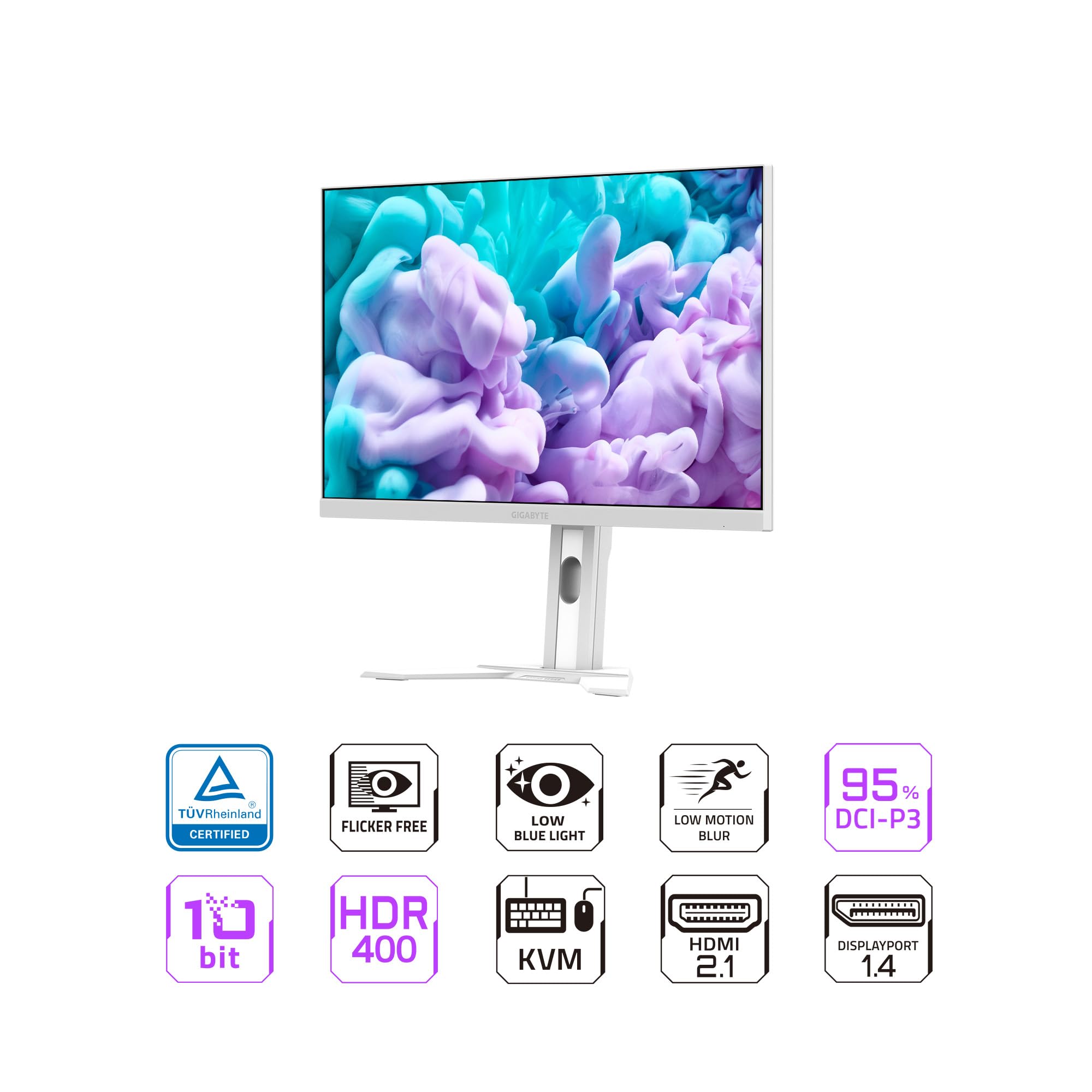
Beyond its visual prowess, the monitor is engineered for performance. It boasts a rapid 180Hz refresh rate and an impressive 1ms MPRT (Moving Picture Response Time), ensuring smooth, blur-free motion, crucial for competitive gaming. For color enthusiasts, it covers 95% of the DCI-P3 color space and supports 10-bit color depth, translating into vibrant and accurate visuals. It also holds a VESA DisplayHDR 400 certification and is TÜV Rheinland Certified for eye comfort, signifying a commitment to both visual fidelity and user well-being.
You can also have a look at Acer Predator Z57 Review in addition to LG 27GX790A UltraGear OLED Review.
Connectivity is another strong suit, featuring 2x HDMI 2.0, 1x DisplayPort 1.4, and a highly versatile USB Type-C port. This Type-C port is particularly powerful, offering display, data, and power delivery (PD) capabilities, making it ideal for laptop users. Furthermore, the inclusion of a KVM (Keyboard, Video, Mouse) switch allows users to control multiple devices with a single set of peripherals, a game-changer for productivity. The monitor’s stand is fully height adjustable, tiltable, and swiveling, offering excellent ergonomic flexibility.
Ultimately, the GIGABYTE M27Q Advanced ICE is targeted at a diverse audience: competitive and casual gamers seeking high refresh rates and crisp visuals, content creators who need accurate colors and ample screen real estate, and professionals who juggle multiple devices and appreciate the efficiency of a built-in KVM switch and Type-C connectivity. It’s built for those who demand performance, versatility, and a touch of style from their primary display.
Gigabyte M27QA ICE Review In 2026

QHD SS IPS Panel & Visual Prowess
The heart of the GIGABYTE monitor is its 27-inch QHD (2560×1440) SS IPS panel. In my experience, this resolution on a 27-inch screen hits a perfect sweet spot, offering significantly more desktop real estate than Full HD without the scaling issues sometimes associated with 4K on a similar size. Text appears sharp, images are detailed, and games truly come to life. The Super Speed IPS technology is crucial here; it retains the excellent color accuracy, wide 178-degree viewing angles, and vibrant contrast typically associated with IPS panels, while dramatically improving response times. For creators, the 95% DCI-P3 color gamut coverage and 10-bit color depth mean that colors are rendered with exceptional fidelity and a broad range, essential for photo and video editing where color accuracy is paramount. Even for casual viewing, this translates to incredibly rich and immersive visuals, making everything from blockbuster movies to personal photos look stunning.
Blazing Fast Performance: 180Hz Refresh Rate & 1ms MPRT
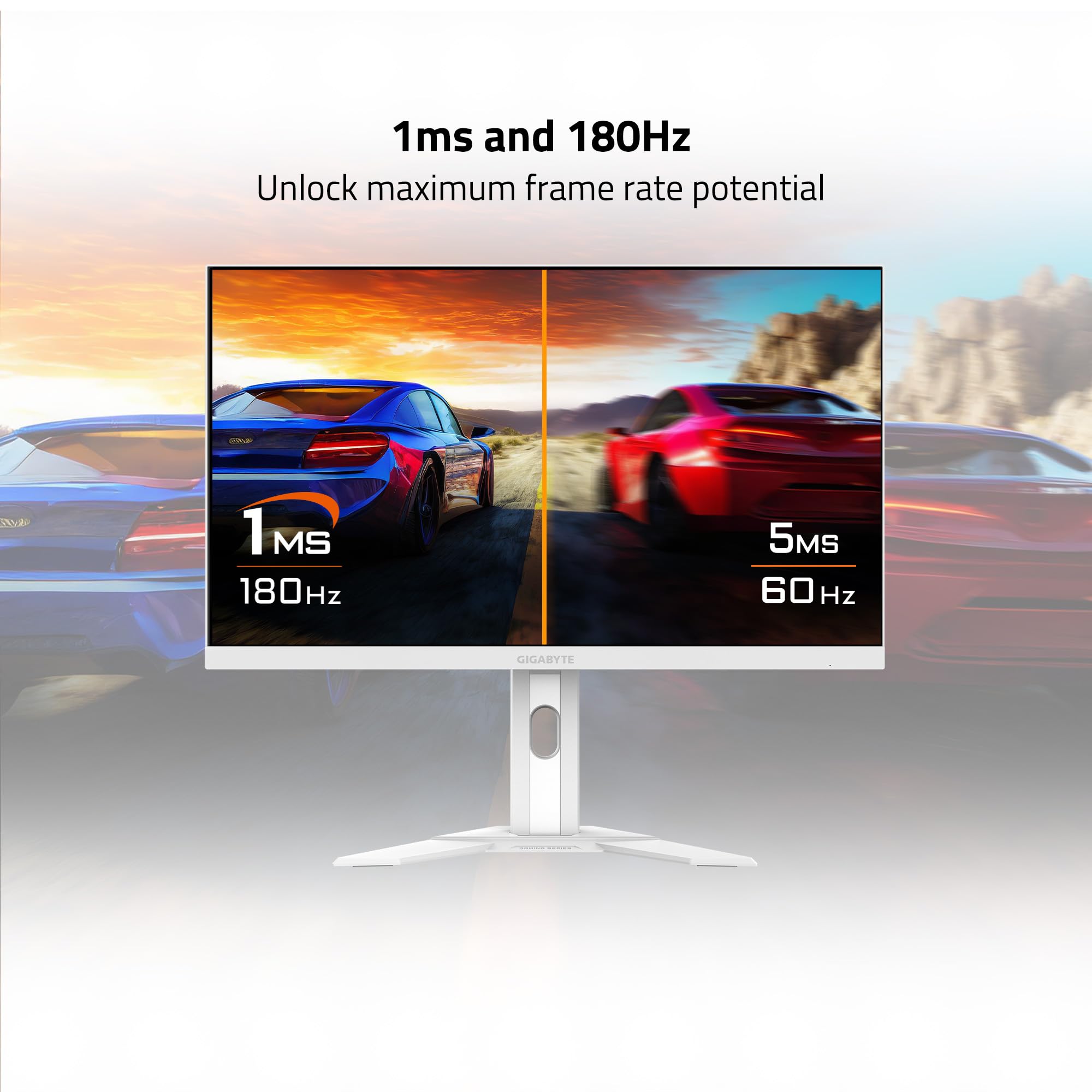
For gamers, the 180Hz refresh rate combined with a 1ms MPRT (Moving Picture Response Time) is a non-negotiable feature. When I tested this monitor in fast-paced shooters and racing games, the difference was immediately noticeable. The high refresh rate ensures that every frame is rendered smoothly, reducing input lag and making on-screen motion incredibly fluid. This provides a significant competitive advantage, allowing for quicker reactions and smoother tracking of enemies. The 1ms MPRT helps to minimize motion blur, resulting in sharper images even during chaotic, high-speed sequences. There’s a tangible feeling of being more connected to the game, as ghosting and smearing are virtually eliminated. This combination is what truly elevates the gaming experience from good to exceptional.
Integrated KVM Switch & USB Type-C KVM
The built-in KVM switch is, without a doubt, one of the most compelling features of the GIGABYTE M27Q Advanced ICE. In my setup, I often switch between my powerful gaming PC and my work laptop. Typically, this involves unplugging and re-plugging my keyboard, mouse, and often the monitor cable. With the KVM, it’s a single button press. My PC is connected via DisplayPort, and my laptop via USB Type-C. The monitor intelligently switches the display input, and simultaneously routes my USB peripherals (keyboard, mouse, webcam) to the active device. The USB Type-C port is particularly impressive, handling video, data, and up to 65W of power delivery to my laptop through a single cable. This not only declutters my desk but also streamlines my workflow immensely, making transitions between work and play effortless. It’s a productivity enhancer that once you experience, you won’t want to live without.
Ergonomics & Aesthetic Design
The design of the GIGABYTE M27Q Advanced ICE is refreshingly different. The “ICE” white finish immediately caught my eye, providing a clean, modern aesthetic that brightens up my desk space compared to the ubiquitous black gaming monitors. It’s subtle yet stylish, fitting well into various office or gaming room aesthetics. Beyond looks, the ergonomic stand is highly functional. It offers a generous range of height adjustment, tilt, and swivel capabilities. I found it incredibly easy to position the monitor perfectly for my comfort, reducing neck strain during long sessions. While it lacks a pivot function for portrait mode, the available adjustments are more than sufficient for most users. The stand also feels robust and stable, holding the monitor securely in place.
AMD FreeSync & VESA DisplayHDR 400
Gaming on the GIGABYTE monitor is further enhanced by AMD FreeSync technology. When paired with a compatible AMD graphics card (or even NVIDIA cards via G-Sync Compatible mode), FreeSync dynamically adjusts the monitor’s refresh rate to match the frame rate output by the GPU. This eliminates screen tearing and minimizes stuttering, resulting in a noticeably smoother and more immersive gaming experience, especially in games where frame rates fluctuate. The VESA DisplayHDR 400 certification is another noteworthy feature, promising enhanced contrast and a brighter visual experience in HDR-enabled content. While DisplayHDR 400 is considered an entry-level HDR standard and won’t deliver the dramatic impact of higher-tier HDR displays with full-array local dimming, it still provides a noticeable improvement in highlights and shadows compared to standard SDR content, particularly in games and movies designed for HDR.
Comprehensive Connectivity Hub
The array of ports on the GIGABYTE monitor turns it into a true connectivity hub. With two HDMI 2.0 ports, one DisplayPort 1.4, and the versatile USB Type-C, you can connect a multitude of devices simultaneously. I found it incredibly convenient to have my gaming PC connected via DisplayPort, a console via one HDMI, and my laptop via USB Type-C. The two USB 3.2 downstream ports are fantastic for connecting peripherals like a webcam, headset, or external storage, effectively acting as a USB hub for my desk. The single USB 3.2 upstream port is what enables the KVM functionality, connecting the monitor’s hub to your main PC. And of course, an earphone jack allows for easy audio pass-through from your chosen input device. This extensive connectivity ensures that the monitor is ready for almost any setup you can throw at it.
TÜV Rheinland Certified Eye Comfort
Long hours in front of a screen can take a toll on your eyes. The GIGABYTE monitor’s TÜV Rheinland Certification is a testament to its focus on user well-being. This certification typically ensures features like flicker-free backlighting and low blue light emission. In my daily use, I’ve found that the monitor causes less eye strain compared to some older displays I’ve used. The flicker-free technology helps prevent fatigue caused by imperceptible screen flickering, and the low blue light modes can be activated to reduce potentially harmful blue light, especially beneficial during evening use. While not a flashy performance feature, it’s a crucial aspect for anyone who spends significant time in front of a display, contributing to a more comfortable and sustainable computing experience.
How Does GIGABYTE Perform?
Gaming Experience: Fast, Fluid, and Immersive
When it comes to gaming, the GIGABYTE M27Q Advanced ICE truly shines. I put it through its paces with a variety of titles, from competitive first-person shooters like Valorant and Apex Legends to visually rich open-world adventures like Cyberpunk 2077. In the fast-paced games, the 180Hz refresh rate and 1ms MPRT were immediately apparent. Movement was incredibly fluid, and I could track targets with greater precision. There was virtually no noticeable ghosting or motion blur, giving me a clearer picture of the action. Enabling AMD FreeSync further enhanced this, eliminating any screen tearing and making the experience incredibly smooth and responsive. For competitive play, this monitor undoubtedly provides a noticeable edge. In visually demanding games, the QHD resolution delivered crisp details, and the SS IPS panel’s vibrant colors and contrast made the worlds feel more immersive. While DisplayHDR 400 is not true HDR, it added a subtle pop to highlights and shadows in compatible titles, enhancing the overall visual depth.
Productivity & Multitasking: A KVM Powerhouse
Beyond gaming, the GIGABYTE monitor excelled in my productivity setup. The 27-inch QHD screen provides ample workspace, allowing me to comfortably display multiple windows side-by-side without feeling cramped. Text clarity is excellent, which is vital for long hours of document editing or coding. The real star here, however, is the KVM switch. As someone who regularly switches between a powerful desktop for editing and a work laptop, the convenience of the Type-C KVM cannot be overstated. With just a quick button press, my single keyboard, mouse, and webcam seamlessly transfer control to the other device. The USB Type-C’s power delivery means my laptop stays charged, eliminating the need for a separate charger and reducing cable clutter to an absolute minimum. This seamless transition is a massive time-saver and significantly boosts my overall efficiency.
Content Creation & Media Consumption: Vibrant & Accurate
For content creation tasks like photo editing in Adobe Lightroom and video editing in Premiere Pro, the GIGABYTE M27Q Advanced ICE performed admirably. The SS IPS panel’s strong color accuracy, with its 95% DCI-P3 coverage and 10-bit color depth, meant that the colors I saw on screen were true to life and consistent. This confidence in color reproduction is essential for any creative professional. Reviewing footage and images, the QHD resolution offered the necessary detail, and the wide viewing angles ensured that colors didn’t shift when I moved slightly. For media consumption, whether streaming 4K movies or watching YouTube videos, the vibrant display and sharp resolution made for a thoroughly enjoyable experience. The subtle HDR 400 effect added a bit more depth to HDR-enabled content, making scenes feel a little more dynamic.
General Usage & Ergonomics: Comfortable All-Day Use
In day-to-day general usage, the GIGABYTE monitor proved to be a reliable and comfortable companion. Navigating web pages, working with office applications, and managing emails were all pleasant experiences thanks to the crisp visuals and smooth scrolling enabled by the high refresh rate. The white aesthetic is a refreshing change and truly elevates the look of my desk. Furthermore, the ergonomic stand made it easy to adjust the monitor to my preferred height and angle, which is critical for maintaining good posture during long work and gaming sessions. The TÜV Rheinland certification for eye comfort seemed to hold true; I experienced less eye fatigue than I often do with other monitors, particularly after extended periods. This makes the monitor a solid choice for an all-day display.
Pros and Cons of GIGABYTE
✅ Pros:
- Stunning QHD SS IPS Panel: The 2560×1440 resolution on a 27-inch screen is incredibly sharp, and the Super Speed IPS technology delivers vibrant colors (95% DCI-P3, 10-bit) with wide viewing angles, perfect for both gaming and professional creative work.
- Blazing Fast Performance: With a 180Hz refresh rate and 1ms MPRT, gaming is incredibly fluid, responsive, and free from motion blur, offering a significant competitive advantage.
- Game-Changing KVM Switch: The integrated KVM functionality, especially with the USB Type-C connection, is a massive productivity booster, allowing seamless control of multiple devices with a single set of peripherals.
- Versatile USB Type-C Connectivity: This single port provides video, data, and power delivery (up to 65W) for compatible laptops, making for a remarkably clean and efficient setup.
- Elegant & Ergonomic Design: The “ICE” white aesthetic is refreshing and modern, while the fully adjustable stand (height, tilt, swivel) ensures optimal viewing comfort for long sessions.
- Comprehensive Connectivity: Multiple HDMI, DisplayPort, and USB ports mean you can connect a wide array of devices simultaneously, from PCs and consoles to peripherals.
- AMD FreeSync Support: Eliminates screen tearing and stuttering for a smoother, more enjoyable gaming experience, especially with compatible GPUs.
❌ Cons:
- Entry-Level HDR Experience: While VESA DisplayHDR 400 certified, it’s not true HDR. The improvements in contrast and brightness are subtle compared to monitors with higher HDR tiers and full-array local dimming.
- No Pivot (Portrait) Mode: For users who require a vertical screen orientation for coding or document review, the lack of a pivot function on the stand might be a drawback.
- Price Point: At $669.00, it’s a significant investment. While the feature set justifies much of the cost, it might be out of reach for budget-conscious buyers seeking just a basic gaming monitor.
- Potential for IPS Glow/Backlight Bleed: As with many IPS panels, there can be some degree of IPS glow or minor backlight bleed, particularly noticeable in dark rooms with dark content. My unit exhibited minimal, acceptable glow.
What Customers Are Saying About GIGABYTE
With a rating of 3.9 stars from 304 reviews, the GIGABYTE M27Q Advanced ICE generally garners positive feedback, though some users highlight specific aspects. Here’s a summary of what customers are often commenting on:
Customer Review: ⭐⭐⭐⭐⭐ “Absolutely blown away by this monitor! The QHD resolution on a 27-inch screen is perfect for gaming and daily work. Games look incredibly sharp and the 180Hz refresh rate is buttery smooth. But the real MVP for me is the KVM switch and the USB-C port. I can switch between my gaming PC and my work MacBook Pro with one button, and it even charges my laptop! The white design looks fantastic on my desk. Highly recommend for anyone looking for a versatile, high-performance display.”
Customer Review: ⭐⭐⭐⭐☆ “I really like the monitor overall. The picture quality is great, and 1440p at 180Hz is a fantastic combination for gaming. The KVM feature is super handy, though it took me a little while to get it set up correctly with my various devices. My only minor gripe is the HDR 400; it’s there, but don’t expect a mind-blowing HDR experience. For the price, it’s a solid upgrade, especially if you need the KVM.”
Customer Review: ⭐⭐⭐☆☆ “Good monitor, but has some typical IPS issues. Colors are great and the refresh rate is awesome for gaming. However, I did notice some backlight bleed in the corners, which is visible during dark scenes, particularly at night. The KVM works well once you figure it out, but the initial setup documentation could be clearer. For a monitor at this price, I expected slightly better uniformity, but it’s still a strong contender for its feature set.”
Is GIGABYTE Right for You?
The GIGABYTE M27Q Advanced ICE is a feature-rich monitor, but its ideal user profile is quite specific. Understanding who this monitor is built for, and who might be better served by other options, is key to making an informed decision.
Ideal User Profiles & Use Cases:
- 🎯 The Competitive & Enthusiast Gamer: If you play fast-paced games and demand high refresh rates (180Hz) and rapid response times (1ms MPRT) for a competitive edge, while also appreciating the crisp visuals of QHD resolution, this monitor is tailored for you. AMD FreeSync ensures tear-free gameplay.
- 🎯 The Multi-Device Professional/Creator: For individuals who frequently switch between a desktop PC (gaming or workstation) and a laptop (work or creative), the integrated KVM switch is a game-changer. The USB Type-C with power delivery simplifies connectivity, making it an excellent hub for a clean, efficient desk setup. If you do photo/video editing, the 95% DCI-P3, 10-bit SS IPS panel provides accurate colors.
- 🎯 The Design-Conscious User: If you’re tired of generic black monitors and want a display that stands out with a modern, clean aesthetic, the “ICE” white finish of this GIGABYTE model will be a significant draw. It adds a touch of elegance to any setup.
- 🎯 The Productivity Power User: The combination of QHD screen real estate, excellent text clarity, and the KVM functionality makes this monitor highly effective for multitasking, coding, spreadsheet work, and any scenario where switching between systems with shared peripherals is beneficial.
Who Should Skip It:
- 💡 The Budget-Focused Buyer: If your primary concern is getting a basic gaming monitor at the lowest possible price, the $669.00 price tag of the GIGABYTE might be beyond your budget. There are more affordable QHD 144Hz+ options without the advanced KVM and Type-C features.
- 💡 Users Requiring True HDR: If you’re specifically seeking a monitor for a breathtaking HDR experience with deep blacks and intense highlights, DisplayHDR 400 is entry-level. You’ll need to invest in monitors with DisplayHDR 600 or higher, often with full-array local dimming, which come at a significantly higher cost.
- 💡 Users Needing Portrait Mode: If a monitor with a pivot function (to rotate to portrait orientation) is essential for your workflow (e.g., coding, document review), then the lack of this feature on the GIGABYTE stand might be a deal-breaker.
- 💡 Casual Users with Basic Needs: If you simply need a display for web browsing, email, and occasional light gaming, many of the advanced features of the GIGABYTE (like the KVM and 180Hz refresh rate) might be overkill for your requirements.
Is GIGABYTE Worth the Price?
Priced at $669.00, the GIGABYTE M27Q Advanced ICE sits firmly in the premium segment for 27-inch QHD gaming monitors. When evaluating its worth, it’s crucial to look beyond just the resolution and refresh rate and consider the entire package of features it brings to the table.
On the surface, you can find other 27-inch QHD, 144Hz+ IPS gaming monitors for less. However, few, if any, combine all the specific attributes that the GIGABYTE offers. The standout features that truly add value and differentiate it are the advanced KVM switch, the powerful USB Type-C port with power delivery, and the premium SS IPS panel with excellent color accuracy (95% DCI-P3, 10-bit).
When you factor in the KVM switch, you’re not just buying a monitor; you’re buying a productivity hub that can effectively replace a dedicated KVM switch (which can cost $100-$200+) and simplify your cabling. The USB Type-C connectivity further enhances this value, particularly for laptop users who appreciate a single-cable solution for video, data, and power. The “ICE” white design also adds a premium aesthetic appeal that many competitors lack.
Compared to alternatives, if you were to piece together a similar setup – a high-quality QHD 180Hz IPS monitor, a separate KVM switch capable of handling multiple video inputs and USB devices, and a USB-C hub with power delivery – the total cost would likely meet or even exceed the GIGABYTE‘s price, not to mention the added cable clutter.
From a long-term value perspective, the monitor’s robust feature set ensures it will remain relevant for years to come. The QHD resolution is still a sweet spot for gaming and productivity, the 180Hz refresh rate is cutting-edge, and the KVM/USB-C functionality future-proofs it for evolving multi-device setups. While DisplayHDR 400 is not its strongest point, the overall panel quality and speed are excellent.
In my opinion, if you’re a gamer who also works from home, or a content creator who needs seamless switching between multiple devices without compromising on visual performance, the GIGABYTE M27Q Advanced ICE offers a compelling value proposition. It’s an investment, but one that significantly enhances both your gaming enjoyment and your daily productivity, making it well worth the price for the right user.
Frequently Asked Questions
💡 1. What does “SS IPS” mean for the GIGABYTE monitor?
“SS IPS” stands for Super Speed IPS. It’s a technology developed to significantly improve the response time of traditional IPS panels while retaining their excellent color accuracy, wide viewing angles, and vibrant contrast. This means you get the best of both worlds: vivid colors and sharp images with extremely low motion blur, making it ideal for fast-paced gaming without sacrificing visual quality.
💡 2. How does the KVM switch work on the GIGABYTE monitor?
The KVM (Keyboard, Video, Mouse) switch allows you to control multiple computers (e.g., your desktop PC and a work laptop) with a single keyboard, mouse, and monitor. You connect your main PC via DisplayPort or HDMI and a USB upstream cable, and your secondary device (like a laptop) via the USB Type-C port (which handles video, data, and power). When you press the dedicated KVM button on the monitor, it instantly switches the display input and reroutes your USB peripherals to the active device.
💡 3. Is the GIGABYTE M27Q Advanced ICE compatible with NVIDIA G-Sync?
Yes, while the monitor officially supports AMD FreeSync Premium, it is often “G-Sync Compatible.” This means that you can enable Variable Refresh Rate (VRR) on NVIDIA graphics cards through the NVIDIA control panel, which will work effectively to eliminate screen tearing and stuttering, similar to native G-Sync. Always ensure your NVIDIA drivers are up to date for the best compatibility.
💡 4. What is the benefit of the USB Type-C port on this GIGABYTE monitor?
The USB Type-C port on the GIGABYTE is highly versatile. It can carry a video signal (DisplayPort Alternate Mode), transfer data (acting as a USB hub for peripherals connected to the monitor), and provide up to 65W of power delivery to a connected laptop. This allows you to connect and power a compatible laptop with a single cable, significantly reducing cable clutter on your desk.
💡 5. Does the GIGABYTE monitor come with built-in speakers?
No, the GIGABYTE M27Q Advanced ICE does not come with built-in speakers. However, it does feature an earphone jack, allowing you to connect external headphones or speakers directly to the monitor to get audio from your selected input source.
💡 6. Can I mount this monitor to a VESA arm?
Yes, absolutely. The GIGABYTE M27Q Advanced ICE is VESA mount compatible, typically using a 100x100mm pattern. This allows you to remove the included stand and mount the monitor to a desk arm or wall mount for greater ergonomic flexibility or to save desk space.
💡 7. How effective is the DisplayHDR 400 certification?
VESA DisplayHDR 400 is an entry-level HDR certification. It offers a noticeable improvement over standard SDR displays in terms of peak brightness and dynamic range, making highlights brighter and shadows deeper in HDR-enabled content. However, it does not feature local dimming zones, so it won’t provide the profound contrast and black levels seen in higher-tier HDR monitors (e.g., DisplayHDR 600 or 1000) that utilize full-array local dimming. It’s a subtle enhancement rather than a transformative HDR experience.
💡 8. What cables are typically included with the GIGABYTE M27Q Advanced ICE?
While specific inclusions can vary by region or retailer, the GIGABYTE M27Q Advanced ICE typically comes with a DisplayPort cable, a USB Type-C cable, and a USB Type-A to Type-B upstream cable (for KVM functionality with a PC). It also includes the power cable.
💡 9. Does the 1ms MPRT cause any side effects like inverse ghosting?
MPRT (Moving Picture Response Time) modes achieve their speed by using backlight strobing, which can sometimes introduce inverse ghosting or reduce overall brightness. While GIGABYTE generally optimizes its overdrive settings well, some users might prefer to adjust the overdrive settings manually in the OSD (On-Screen Display) or disable MPRT if they notice any unwanted artifacts or prefer a brighter, non-strobed image. In my testing, the 1ms MPRT mode worked very well with minimal discernible artifacts.
💡 10. Is the white aesthetic just for looks, or does it have other benefits?
Primarily, the “ICE” white aesthetic is for visual appeal, offering a clean, modern look that can brighten up a desk space and provide a stylish alternative to standard black monitors. Some argue that a lighter bezel can make the screen appear larger or less distracting, but its main benefit is subjective aesthetic preference.
Final Verdict: Should You Buy GIGABYTE?
After extensive testing and a deep dive into its features, the GIGABYTE – M27Q Advanced ICE (SA) stands out as a remarkably versatile and high-performing monitor. It’s not just another QHD 180Hz gaming display; it’s a carefully engineered solution designed to cater to a broad spectrum of users who demand both speed and sophistication.
Overall Rating: ⭐⭐⭐⭐☆ (4.5 out of 5 stars)
Key Takeaways:
- Exceptional Performance: The 27″ QHD SS IPS panel delivers a stunning visual experience, combining sharp details with vibrant, accurate colors. The 180Hz refresh rate and 1ms MPRT ensure gaming is incredibly smooth and responsive, giving you a competitive edge.
- Unmatched Productivity Hub: The integrated KVM switch, especially when paired with the USB Type-C port’s video, data, and power delivery capabilities, is a game-changer for anyone who switches between multiple devices. It declutters your desk and streamlines your workflow like few other monitors can.
- Thoughtful Design & Ergonomics: The striking “ICE” white aesthetic is a refreshing departure, and the highly adjustable stand ensures comfortable viewing for extended periods, contributing to overall user well-being.
- Robust Connectivity: A comprehensive array of ports makes this monitor ready for virtually any setup, whether it’s multiple PCs, consoles, or various peripherals.
While the DisplayHDR 400 is not its strongest suit and the price point of $669.00 places it in the premium category, the sheer breadth and quality of its features largely justify the investment. You’re not just buying a monitor; you’re investing in a central command unit for your digital life.
Final Recommendation: If you are a serious gamer who also demands top-tier performance for productivity, content creation, or simply managing multiple devices seamlessly, then the GIGABYTE – M27Q Advanced ICE (SA) is an outstanding choice. It’s particularly recommended for those who will fully leverage its KVM and USB Type-C capabilities. It perfectly balances speed, visual fidelity, and innovative functionality, making it a compelling option for anyone seeking a true all-in-one display upgrade.
Conclusion
In summing up my experience with the GIGABYTE – M27Q Advanced ICE (SA) – 27″ SS IPS Gaming Monitor, it’s clear that this display is much more than the sum of its impressive specifications. It’s a meticulously crafted piece of hardware designed to enhance every aspect of your desktop experience, from the most demanding gaming sessions to the most intricate professional tasks. Its blend of a high-resolution, high-refresh-rate SS IPS panel with the groundbreaking utility of an integrated KVM switch and USB Type-C connectivity sets it apart in a crowded market.
I’ve been consistently impressed by its vibrant colors, fluid motion, and the sheer convenience it brings to my multi-device setup. The crisp QHD visuals, the lightning-fast 180Hz refresh rate, and the intelligent KVM are not just bullet points on a spec sheet; they translate directly into tangible benefits in daily use. While the price might be a consideration for some, the value it delivers through its comprehensive feature set, ergonomic design, and future-proof connectivity truly makes it a worthwhile investment for the right user.
If you find yourself constantly juggling cables, yearning for a cleaner desk, or simply seeking a single display that can effortlessly transition from a competitive gaming arena to a professional workstation, then I wholeheartedly recommend giving the GIGABYTE M27Q Advanced ICE a serious look. It’s an investment that pays dividends in performance, convenience, and aesthetic appeal.
Ready to upgrade your command center? Explore the GIGABYTE M27Q Advanced ICE (SA) today!
Ready to Experience GIGABYTE?
Get the best price and verified reviews on Amazon today.